Tablet Rear Camera Issue
Read more
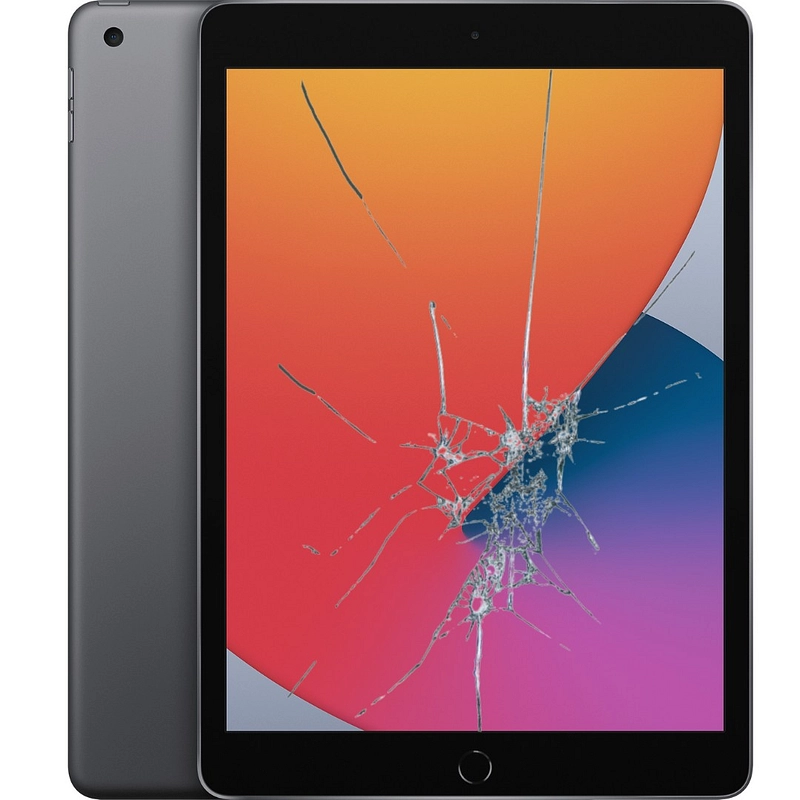
If your tablet screen is cracked, shattered, unresponsive, or displaying visual problems, continue reading to learn more about the causes, risks, and repair options available.
Common Tablet Screen Damage Problems
Tablet screens are used constantly for browsing, streaming, gaming, work, and communication, making them vulnerable to damage over time. Screen damage may appear as cracks, spiderweb patterns, black spots, flickering images, dead zones, or touch sensitivity issues. In some cases, the display may stop responding altogether while the device itself continues to power on.
Causes of Tablet Screen Damage
Most tablet screen damage is caused by accidental drops, pressure from heavy objects, or impacts during transport. Sitting on a tablet, placing it in an overfilled bag, or exposing it to extreme temperature changes can weaken the glass and lead to cracking. Liquid exposure may also damage internal screen components, resulting in display or touch issues.
Troubleshooting Screen Damage Issues
While physical screen damage cannot be repaired through software, it’s important to rule out minor issues. Restart the tablet to check for temporary glitches, and inspect the screen for visible cracks or discoloration. If touch response is inconsistent, remove any screen protector or case that may be interfering. Backing up your data is recommended if the screen condition worsens.
Risks of Using a Damaged Tablet Screen
Using a tablet with a damaged screen can be unsafe and inconvenient. Sharp glass edges may cause cuts, and cracks can spread further with daily use. A broken screen can also allow dust and moisture to enter the device, potentially damaging internal components and leading to more costly repairs if left untreated.
Repairing Tablet Screen Damage
If your tablet screen is damaged, professional repair is the safest and most effective solution. The technicians at Cell Phone Repair can replace cracked or broken tablet screens and restore full functionality. Visit a local store for same-day repairs or mail in your tablet at your convenience. Free repair estimates are always available.
Other Issues



Get It Fixed Today!
CPR Cell Phone Repair can provide holistic warranty and repair solutions for all of your business’ devices.

Buy or Sell Your Device
CPR Cell Phone Repair can provide holistic warranty and repair solutions for all of your business’ devices.




All CPR Stores are independently owned and operated and may not offer all of the repair and warranty types listed on this website. Contact your local store for their specific repair capabilities and warranty terms. MMI-CPR, LLC and CPR Stores are not liable for warranties made by third parties on specific accessories or devices sold at CPR Stores. All product and company names are trademarks of their respective holders. iPhone, iPad, iPod, iPod touch, Mac and iMac are registered trademarks and property of Apple, Inc. CPR is a third-party repair company and is not affiliated with Apple.
Screen Damage
If your tablet screen is cracked, shattered, unresponsive, or displaying visual problems, continue reading to learn more about the causes, risks, and repair options available.
Common Tablet Screen Damage Problems
Tablet screens are used constantly for browsing, streaming, gaming, work, and communication, making them vulnerable to damage over time. Screen damage may appear as cracks, spiderweb patterns, black spots, flickering images, dead zones, or touch sensitivity issues. In some cases, the display may stop responding altogether while the device itself continues to power on.
Causes of Tablet Screen Damage
Most tablet screen damage is caused by accidental drops, pressure from heavy objects, or impacts during transport. Sitting on a tablet, placing it in an overfilled bag, or exposing it to extreme temperature changes can weaken the glass and lead to cracking. Liquid exposure may also damage internal screen components, resulting in display or touch issues.
Troubleshooting Screen Damage Issues
While physical screen damage cannot be repaired through software, it’s important to rule out minor issues. Restart the tablet to check for temporary glitches, and inspect the screen for visible cracks or discoloration. If touch response is inconsistent, remove any screen protector or case that may be interfering. Backing up your data is recommended if the screen condition worsens.
Risks of Using a Damaged Tablet Screen
Using a tablet with a damaged screen can be unsafe and inconvenient. Sharp glass edges may cause cuts, and cracks can spread further with daily use. A broken screen can also allow dust and moisture to enter the device, potentially damaging internal components and leading to more costly repairs if left untreated.
Repairing Tablet Screen Damage
If your tablet screen is damaged, professional repair is the safest and most effective solution. The technicians at Cell Phone Repair can replace cracked or broken tablet screens and restore full functionality. Visit a local store for same-day repairs or mail in your tablet at your convenience. Free repair estimates are always available.
Choose what you need fixed to begin your Free repair estimate — we’ll guide you every step of the way.
Smartphone
Computer
Tablet

Console
All CPR Stores are independently owned and operated and may not offer all of the repair and warranty types listed on this website. Contact your local store for their specific repair capabilities and warranty terms. MMI-CPR, LLC and CPR Stores are not liable for warranties made by third parties on specific accessories or devices sold at CPR Stores. All product and company names are trademarks of their respective holders. iPhone, iPad, iPod, iPod touch, Mac and iMac are registered trademarks and property of Apple, Inc. CPR is a third-party repair company and is not affiliated with Apple.