Tablet Screen Damage
Read more
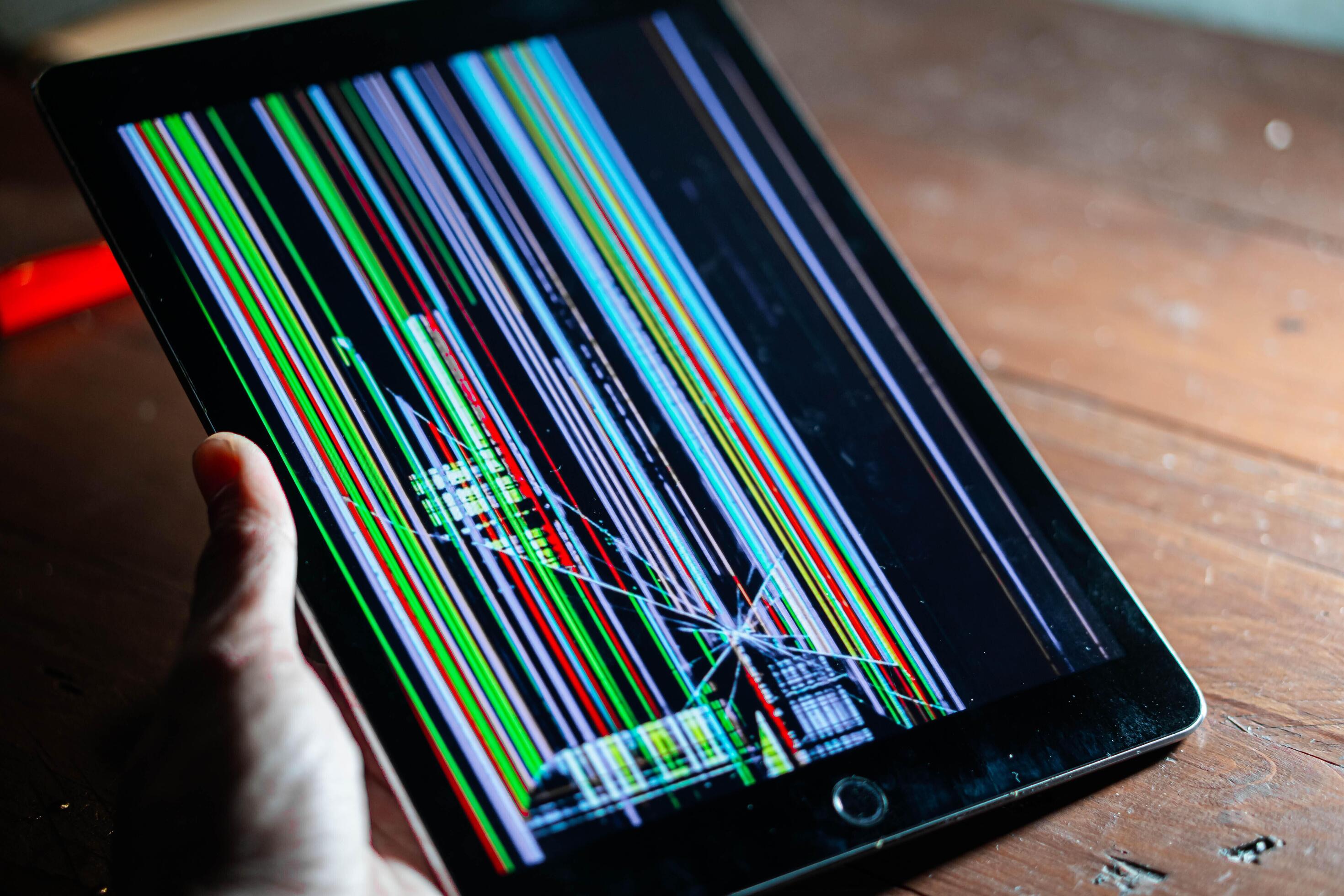
If your tablet’s LCD display is not working properly, showing visual defects, or failing to respond, continue reading to learn what may be causing the problem and how it can be resolved.
Common Tablet LCD Display Problems
The LCD screen is one of the most important components of your tablet, allowing you to view content, interact with apps, and perform daily tasks. LCD issues may include a blank or black screen, flickering display, vertical or horizontal lines, discoloration, dead spots, uneven brightness, or images that appear distorted. In some cases, the touchscreen may still respond while the display itself does not show correctly.
Causes of LCD Display Issues
Tablet LCD problems are often caused by accidental drops, pressure damage, or impact to the screen. Internal connector issues, liquid exposure, or manufacturing defects can also affect the LCD’s performance. Software problems such as corrupted updates or incompatible apps may cause display glitches, but physical damage to the LCD panel is the most common cause of persistent display issues.
Troubleshooting Tablet LCD Issues
Begin troubleshooting by restarting your tablet to rule out temporary software glitches. Check for system updates that may address display-related bugs. Adjust brightness settings and test the screen in different lighting conditions. If the screen shows lines, black spots, or remains blank even after a restart, the LCD panel is likely damaged and cannot be repaired through software adjustments.
Impact of Ignoring LCD Display Problems
Ignoring LCD issues can lead to worsening screen performance and make the tablet difficult or impossible to use. Visual defects may spread over time, and internal damage can affect other components. A damaged LCD can also interfere with touch accuracy, making everyday tasks frustrating and unreliable.
Repairing Tablet LCD Display Issues
If troubleshooting does not resolve the problem, professional repair is recommended. The technicians at Cell Phone Repair can diagnose LCD display issues and replace damaged panels using high-quality parts. Visit a local store for same-day tablet repairs or mail in your device at your convenience. Free repair estimates are always available.
Other Issues
Get It Fixed Today!
CPR Cell Phone Repair can provide holistic warranty and repair solutions for all of your business’ devices.

Buy or Sell Your Device
CPR Cell Phone Repair can provide holistic warranty and repair solutions for all of your business’ devices.




All CPR Stores are independently owned and operated and may not offer all of the repair and warranty types listed on this website. Contact your local store for their specific repair capabilities and warranty terms. MMI-CPR, LLC and CPR Stores are not liable for warranties made by third parties on specific accessories or devices sold at CPR Stores. All product and company names are trademarks of their respective holders. iPhone, iPad, iPod, iPod touch, Mac and iMac are registered trademarks and property of Apple, Inc. CPR is a third-party repair company and is not affiliated with Apple.

Display Issue - LCD
If your tablet’s LCD display is not working properly, showing visual defects, or failing to respond, continue reading to learn what may be causing the problem and how it can be resolved.
Common Tablet LCD Display Problems
The LCD screen is one of the most important components of your tablet, allowing you to view content, interact with apps, and perform daily tasks. LCD issues may include a blank or black screen, flickering display, vertical or horizontal lines, discoloration, dead spots, uneven brightness, or images that appear distorted. In some cases, the touchscreen may still respond while the display itself does not show correctly.
Causes of LCD Display Issues
Tablet LCD problems are often caused by accidental drops, pressure damage, or impact to the screen. Internal connector issues, liquid exposure, or manufacturing defects can also affect the LCD’s performance. Software problems such as corrupted updates or incompatible apps may cause display glitches, but physical damage to the LCD panel is the most common cause of persistent display issues.
Troubleshooting Tablet LCD Issues
Begin troubleshooting by restarting your tablet to rule out temporary software glitches. Check for system updates that may address display-related bugs. Adjust brightness settings and test the screen in different lighting conditions. If the screen shows lines, black spots, or remains blank even after a restart, the LCD panel is likely damaged and cannot be repaired through software adjustments.
Impact of Ignoring LCD Display Problems
Ignoring LCD issues can lead to worsening screen performance and make the tablet difficult or impossible to use. Visual defects may spread over time, and internal damage can affect other components. A damaged LCD can also interfere with touch accuracy, making everyday tasks frustrating and unreliable.
Repairing Tablet LCD Display Issues
If troubleshooting does not resolve the problem, professional repair is recommended. The technicians at Cell Phone Repair can diagnose LCD display issues and replace damaged panels using high-quality parts. Visit a local store for same-day tablet repairs or mail in your device at your convenience. Free repair estimates are always available.
Choose what you need fixed to begin your Free repair estimate — we’ll guide you every step of the way.
Smartphone
Computer
Tablet

Console
All CPR Stores are independently owned and operated and may not offer all of the repair and warranty types listed on this website. Contact your local store for their specific repair capabilities and warranty terms. MMI-CPR, LLC and CPR Stores are not liable for warranties made by third parties on specific accessories or devices sold at CPR Stores. All product and company names are trademarks of their respective holders. iPhone, iPad, iPod, iPod touch, Mac and iMac are registered trademarks and property of Apple, Inc. CPR is a third-party repair company and is not affiliated with Apple.