Computer Memory / Hard Drive Upgrade
Read more
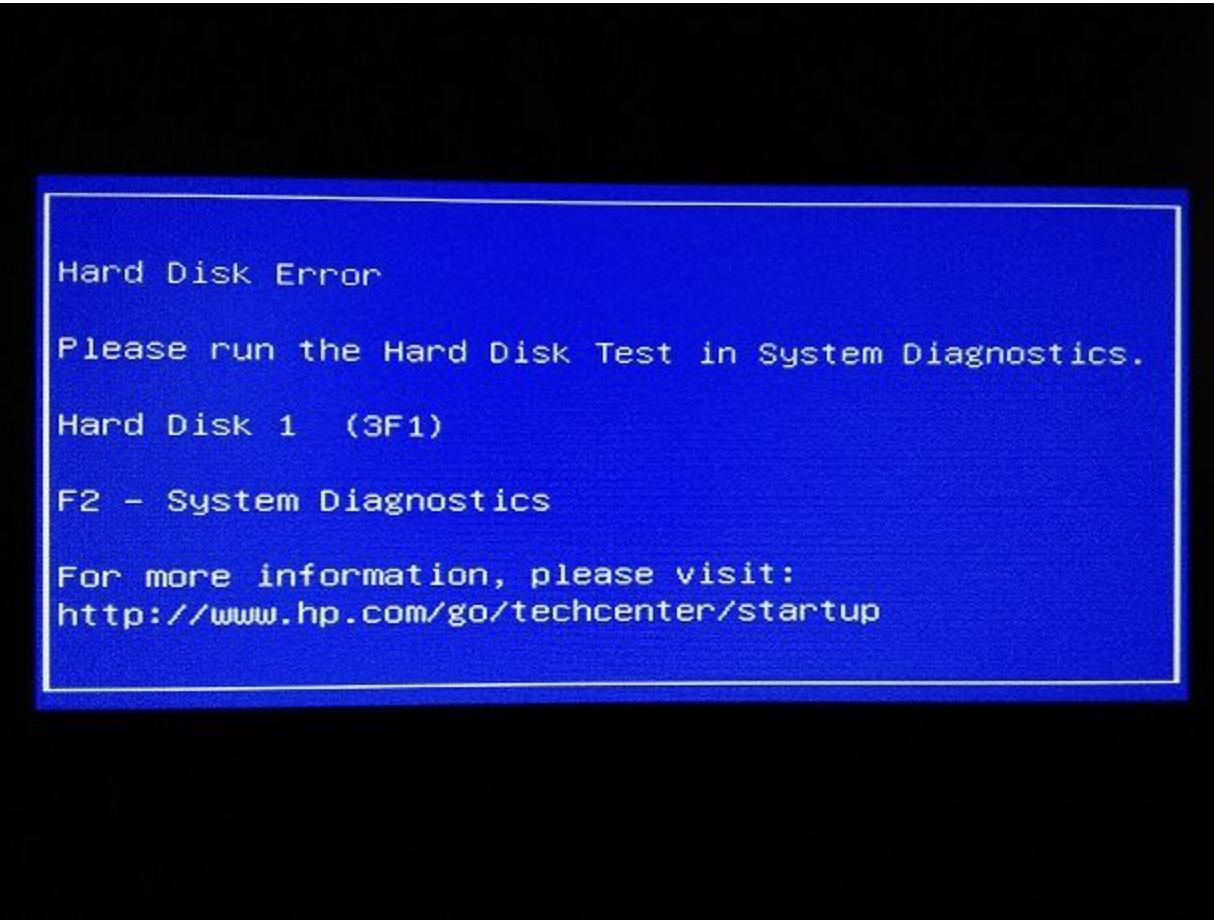
If your computer fails to start properly, shows error messages during boot, or cannot detect the hard drive, continue reading to understand possible causes, warning signs, and repair solutions.
Hard drives play a critical role in storing your operating system, programs, and personal data. When issues arise, you may experience symptoms such as a black screen, “operating system not found” messages, endless loading screens, clicking or grinding noises, or repeated restarts. In some cases, the computer may power on but fail to load into the operating system.
Start-up and hard drive issues can be caused by corrupted system files, failed software updates, power surges, overheating, or physical damage to the hard drive. Aging hard drives are especially prone to failure after years of use. Malware infections, improper shutdowns, or loose internal connections can also prevent the system from booting correctly.
Begin by restarting the computer and disconnecting any external devices such as USB drives or external hard disks. Listen for unusual noises coming from the computer, as this may indicate hard drive failure. If possible, attempt to access the system’s recovery or BIOS settings to check whether the hard drive is being detected. Avoid repeated restart attempts if the system fails to load, as this may worsen the issue.
Ignoring start-up errors or hard drive issues can result in permanent data loss. A failing hard drive may completely stop working without warning, making file recovery difficult or impossible. Continued use may also affect other system components and lead to more costly repairs.
Professional diagnosis is recommended for start-up and hard drive problems. The technicians at Cell Phone Repair can identify the cause, recover data when possible, and repair or replace faulty hard drives. Visit a local store for same-day service or bring in your computer for evaluation. Free repair estimates are always available.
Other Issues
Get It Fixed Today!
CPR Cell Phone Repair can provide holistic warranty and repair solutions for all of your business’ devices.

Buy or Sell Your Device
CPR Cell Phone Repair can provide holistic warranty and repair solutions for all of your business’ devices.




All CPR Stores are independently owned and operated and may not offer all of the repair and warranty types listed on this website. Contact your local store for their specific repair capabilities and warranty terms. MMI-CPR, LLC and CPR Stores are not liable for warranties made by third parties on specific accessories or devices sold at CPR Stores. All product and company names are trademarks of their respective holders. iPhone, iPad, iPod, iPod touch, Mac and iMac are registered trademarks and property of Apple, Inc. CPR is a third-party repair company and is not affiliated with Apple.

Start Up Error / Hard Drive
If your computer fails to start properly, shows error messages during boot, or cannot detect the hard drive, continue reading to understand possible causes, warning signs, and repair solutions.
Hard drives play a critical role in storing your operating system, programs, and personal data. When issues arise, you may experience symptoms such as a black screen, “operating system not found” messages, endless loading screens, clicking or grinding noises, or repeated restarts. In some cases, the computer may power on but fail to load into the operating system.
Start-up and hard drive issues can be caused by corrupted system files, failed software updates, power surges, overheating, or physical damage to the hard drive. Aging hard drives are especially prone to failure after years of use. Malware infections, improper shutdowns, or loose internal connections can also prevent the system from booting correctly.
Begin by restarting the computer and disconnecting any external devices such as USB drives or external hard disks. Listen for unusual noises coming from the computer, as this may indicate hard drive failure. If possible, attempt to access the system’s recovery or BIOS settings to check whether the hard drive is being detected. Avoid repeated restart attempts if the system fails to load, as this may worsen the issue.
Ignoring start-up errors or hard drive issues can result in permanent data loss. A failing hard drive may completely stop working without warning, making file recovery difficult or impossible. Continued use may also affect other system components and lead to more costly repairs.
Professional diagnosis is recommended for start-up and hard drive problems. The technicians at Cell Phone Repair can identify the cause, recover data when possible, and repair or replace faulty hard drives. Visit a local store for same-day service or bring in your computer for evaluation. Free repair estimates are always available.
Choose what you need fixed to begin your Free repair estimate — we’ll guide you every step of the way.
Smartphone
Computer
Tablet
Console
All CPR Stores are independently owned and operated and may not offer all of the repair and warranty types listed on this website. Contact your local store for their specific repair capabilities and warranty terms. MMI-CPR, LLC and CPR Stores are not liable for warranties made by third parties on specific accessories or devices sold at CPR Stores. All product and company names are trademarks of their respective holders. iPhone, iPad, iPod, iPod touch, Mac and iMac are registered trademarks and property of Apple, Inc. CPR is a third-party repair company and is not affiliated with Apple.