Computer Battery Replacement
Read more
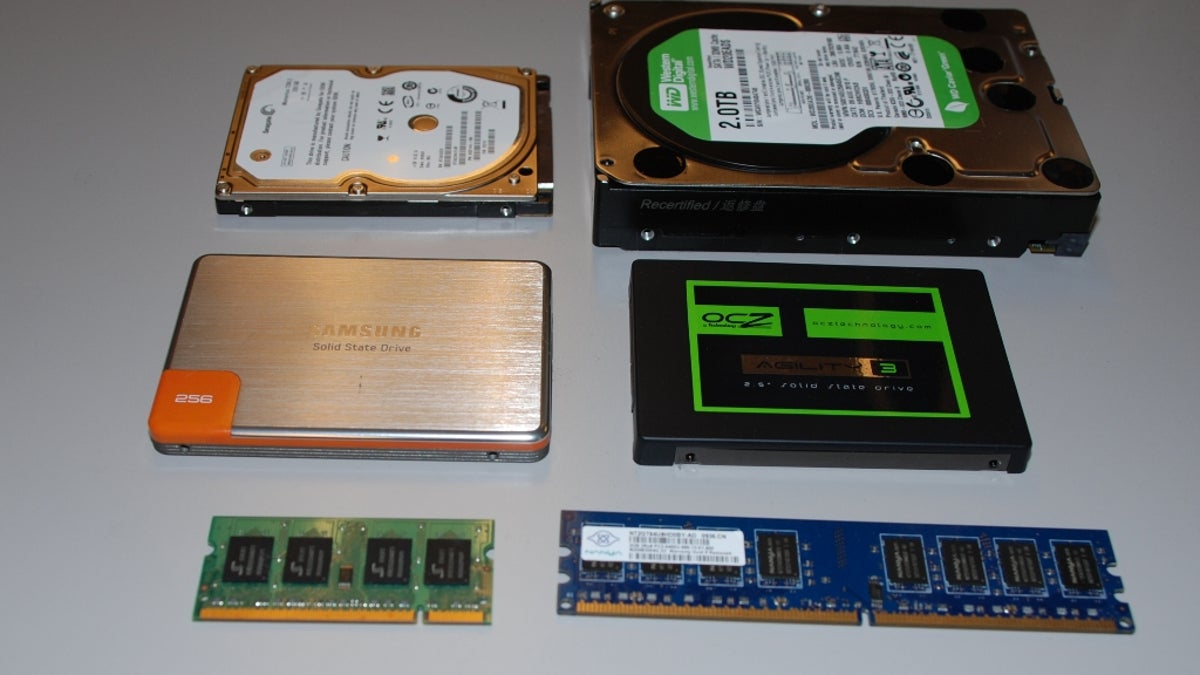
If your computer is running slowly, taking a long time to start, or struggling with everyday tasks, a memory or hard drive upgrade may significantly improve performance. Continue reading to learn how these upgrades can enhance speed, storage, and overall reliability.
Signs Your Computer Needs an Upgrade
Over time, computers can become less responsive as software requirements increase. Common signs that an upgrade may be needed include slow boot times, frequent freezing, lag when opening programs, limited storage space, and error messages related to low memory or disk capacity. Older systems with minimal RAM or traditional hard drives often benefit the most from upgrades.
Benefits of Memory (RAM) Upgrades
Memory, or RAM, allows your computer to run multiple programs smoothly at the same time. Upgrading RAM can reduce lag, improve multitasking, and enhance overall system responsiveness. This is especially helpful for tasks such as web browsing with multiple tabs, office applications, photo editing, and light gaming.
Benefits of Hard Drive Upgrades
Upgrading your hard drive can dramatically improve both performance and storage capacity. Replacing a traditional hard disk drive (HDD) with a solid-state drive (SSD) can result in faster startup times, quicker file access, and improved reliability. Larger-capacity drives also provide more space for documents, photos, videos, and software without constant storage management.
Things to Consider Before Upgrading
Before upgrading, it’s important to ensure compatibility with your computer’s hardware. Data backup is also recommended to prevent data loss during the upgrade process. Professional installation helps ensure proper configuration, data transfer, and optimal performance after the upgrade is complete.
Professional Upgrade Services
The technicians at Cell Phone Repair can evaluate your computer and recommend the best memory or hard drive upgrade for your needs. Whether you’re looking to boost speed, increase storage, or extend the life of your computer, professional upgrades offer reliable results. Visit a local store for same-day service or bring in your computer for a free performance evaluation and estimate.
Computer Memory / Hard Drive Upgrade
If your computer feels slow, struggles to keep up with daily tasks, or constantly runs out of storage, upgrading the memory or hard drive can dramatically improve performance and extend the life of your system. Continue reading to learn how these upgrades can make a noticeable difference.
Common Signs You Need a Computer Upgrade
As software and operating systems evolve, older computers may no longer perform efficiently. Signs that your computer could benefit from a memory or hard drive upgrade include slow startup times, lag when opening programs, frequent freezing or crashing, limited storage space, and poor multitasking performance. These issues often indicate that the system’s current hardware is no longer meeting usage demands.
Memory (RAM) Upgrade Benefits
Memory, also known as RAM, allows your computer to run applications smoothly and handle multiple tasks at once. Insufficient RAM can cause slowdowns, especially when running several programs or browser tabs. Upgrading memory can improve speed, reduce system lag, and enhance overall responsiveness. This is ideal for work tasks, online browsing, streaming, video calls, and creative applications.
Hard Drive Upgrade Benefits
Hard drive upgrades improve both storage capacity and system performance. Replacing a traditional hard disk drive (HDD) with a solid-state drive (SSD) can significantly reduce boot times, speed up file access, and improve system reliability. Larger storage drives also provide more room for documents, photos, videos, and software without the constant need to delete files.
Important Considerations Before Upgrading
Before upgrading, it’s important to ensure the new memory or hard drive is compatible with your computer. Backing up your data is strongly recommended to prevent data loss during installation. Professional installation ensures that components are properly configured and that data is transferred safely and efficiently.
Professional Memory and Hard Drive Upgrade Services
The technicians at Cell Phone Repair can evaluate your computer and recommend the best upgrade options based on your needs and usage. Whether you want faster performance, increased storage, or improved reliability, professional upgrades can restore your computer’s efficiency. Visit a local store for same-day service or bring in your computer for a free estimate and consultation.
Other Issues

Get It Fixed Today!
CPR Cell Phone Repair can provide holistic warranty and repair solutions for all of your business’ devices.

Buy or Sell Your Device
CPR Cell Phone Repair can provide holistic warranty and repair solutions for all of your business’ devices.




All CPR Stores are independently owned and operated and may not offer all of the repair and warranty types listed on this website. Contact your local store for their specific repair capabilities and warranty terms. MMI-CPR, LLC and CPR Stores are not liable for warranties made by third parties on specific accessories or devices sold at CPR Stores. All product and company names are trademarks of their respective holders. iPhone, iPad, iPod, iPod touch, Mac and iMac are registered trademarks and property of Apple, Inc. CPR is a third-party repair company and is not affiliated with Apple.
Memory / Hard Drive Upgrade
If your computer is running slowly, taking a long time to start, or struggling with everyday tasks, a memory or hard drive upgrade may significantly improve performance. Continue reading to learn how these upgrades can enhance speed, storage, and overall reliability.
Signs Your Computer Needs an Upgrade
Over time, computers can become less responsive as software requirements increase. Common signs that an upgrade may be needed include slow boot times, frequent freezing, lag when opening programs, limited storage space, and error messages related to low memory or disk capacity. Older systems with minimal RAM or traditional hard drives often benefit the most from upgrades.
Benefits of Memory (RAM) Upgrades
Memory, or RAM, allows your computer to run multiple programs smoothly at the same time. Upgrading RAM can reduce lag, improve multitasking, and enhance overall system responsiveness. This is especially helpful for tasks such as web browsing with multiple tabs, office applications, photo editing, and light gaming.
Benefits of Hard Drive Upgrades
Upgrading your hard drive can dramatically improve both performance and storage capacity. Replacing a traditional hard disk drive (HDD) with a solid-state drive (SSD) can result in faster startup times, quicker file access, and improved reliability. Larger-capacity drives also provide more space for documents, photos, videos, and software without constant storage management.
Things to Consider Before Upgrading
Before upgrading, it’s important to ensure compatibility with your computer’s hardware. Data backup is also recommended to prevent data loss during the upgrade process. Professional installation helps ensure proper configuration, data transfer, and optimal performance after the upgrade is complete.
Professional Upgrade Services
The technicians at Cell Phone Repair can evaluate your computer and recommend the best memory or hard drive upgrade for your needs. Whether you’re looking to boost speed, increase storage, or extend the life of your computer, professional upgrades offer reliable results. Visit a local store for same-day service or bring in your computer for a free performance evaluation and estimate.
Computer Memory / Hard Drive Upgrade
If your computer feels slow, struggles to keep up with daily tasks, or constantly runs out of storage, upgrading the memory or hard drive can dramatically improve performance and extend the life of your system. Continue reading to learn how these upgrades can make a noticeable difference.
Common Signs You Need a Computer Upgrade
As software and operating systems evolve, older computers may no longer perform efficiently. Signs that your computer could benefit from a memory or hard drive upgrade include slow startup times, lag when opening programs, frequent freezing or crashing, limited storage space, and poor multitasking performance. These issues often indicate that the system’s current hardware is no longer meeting usage demands.
Memory (RAM) Upgrade Benefits
Memory, also known as RAM, allows your computer to run applications smoothly and handle multiple tasks at once. Insufficient RAM can cause slowdowns, especially when running several programs or browser tabs. Upgrading memory can improve speed, reduce system lag, and enhance overall responsiveness. This is ideal for work tasks, online browsing, streaming, video calls, and creative applications.
Hard Drive Upgrade Benefits
Hard drive upgrades improve both storage capacity and system performance. Replacing a traditional hard disk drive (HDD) with a solid-state drive (SSD) can significantly reduce boot times, speed up file access, and improve system reliability. Larger storage drives also provide more room for documents, photos, videos, and software without the constant need to delete files.
Important Considerations Before Upgrading
Before upgrading, it’s important to ensure the new memory or hard drive is compatible with your computer. Backing up your data is strongly recommended to prevent data loss during installation. Professional installation ensures that components are properly configured and that data is transferred safely and efficiently.
Professional Memory and Hard Drive Upgrade Services
The technicians at Cell Phone Repair can evaluate your computer and recommend the best upgrade options based on your needs and usage. Whether you want faster performance, increased storage, or improved reliability, professional upgrades can restore your computer’s efficiency. Visit a local store for same-day service or bring in your computer for a free estimate and consultation.
Choose what you need fixed to begin your Free repair estimate — we’ll guide you every step of the way.

Smartphone
Computer
Tablet
Console
All CPR Stores are independently owned and operated and may not offer all of the repair and warranty types listed on this website. Contact your local store for their specific repair capabilities and warranty terms. MMI-CPR, LLC and CPR Stores are not liable for warranties made by third parties on specific accessories or devices sold at CPR Stores. All product and company names are trademarks of their respective holders. iPhone, iPad, iPod, iPod touch, Mac and iMac are registered trademarks and property of Apple, Inc. CPR is a third-party repair company and is not affiliated with Apple.