Battery Drains Fast
Read more
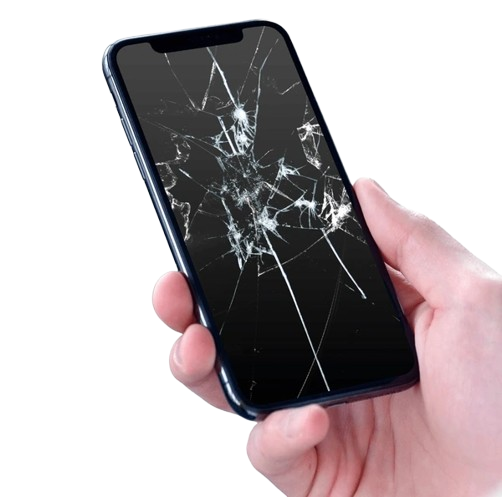
If your smartphone screen is dead, shattered, or malfunctioning, continue reading for help troubleshooting the problem.
From online shopping, emailing and texting to social media usage, photography and more, you’re constantly using your smartphone’s touchscreen. With so much wear and tear, it’s no wonder that smartphone displays malfunction from time to time.
Touchscreens operate using a complex set of components designed to “feel” your fingers as they move across the screen. If these components are not functioning properly, you could have problems like spots or discoloration, little or no backlight, flickering screen backlight, or buttons that don’t function. There are a few things that you can do to troubleshoot your cell phone screen problems before seeking repair.
Problems with your cell phone screen can be caused by a number of issues. It could actually be the result of a software problem. Try powering of the device and then turning it back on to try to reset the software. Then check the screen to see if it has improved. The charge could be low, or the battery could be damaged. Try charging the phone for several hours and checking the screen again.
Sometimes the nature of the screen display can reveal the problem. If the screen is discolored, use a pen cap to lightly rub the screen in the discolored area. If the issue is stuck pixels, applying mild pressure to the screen might fix it. If you have a slider-style phone with a white screen, the issue could be a ribbon cable that has worn out or moved out of its socket. You might be able to move it back into place by tapping on the back of the phone where the battery is held.
If you have tried troubleshooting these issues and still have a problem, the technicians at Cell Phone Repair are ready to help you. Walk into a local store for same day repairs, or mail the phone in at your convenience. We will give you a free estimate to repair your cell phone screen.
Other Issues

Get It Fixed Today!
CPR Cell Phone Repair can provide holistic warranty and repair solutions for all of your business’ devices.

Buy or Sell Your Device
CPR Cell Phone Repair can provide holistic warranty and repair solutions for all of your business’ devices.




All CPR Stores are independently owned and operated and may not offer all of the repair and warranty types listed on this website. Contact your local store for their specific repair capabilities and warranty terms. MMI-CPR, LLC and CPR Stores are not liable for warranties made by third parties on specific accessories or devices sold at CPR Stores. All product and company names are trademarks of their respective holders. iPhone, iPad, iPod, iPod touch, Mac and iMac are registered trademarks and property of Apple, Inc. CPR is a third-party repair company and is not affiliated with Apple.
Screen Damage
If your smartphone screen is dead, shattered, or malfunctioning, continue reading for help troubleshooting the problem.
From online shopping, emailing and texting to social media usage, photography and more, you’re constantly using your smartphone’s touchscreen. With so much wear and tear, it’s no wonder that smartphone displays malfunction from time to time.
Touchscreens operate using a complex set of components designed to “feel” your fingers as they move across the screen. If these components are not functioning properly, you could have problems like spots or discoloration, little or no backlight, flickering screen backlight, or buttons that don’t function. There are a few things that you can do to troubleshoot your cell phone screen problems before seeking repair.
Problems with your cell phone screen can be caused by a number of issues. It could actually be the result of a software problem. Try powering of the device and then turning it back on to try to reset the software. Then check the screen to see if it has improved. The charge could be low, or the battery could be damaged. Try charging the phone for several hours and checking the screen again.
Sometimes the nature of the screen display can reveal the problem. If the screen is discolored, use a pen cap to lightly rub the screen in the discolored area. If the issue is stuck pixels, applying mild pressure to the screen might fix it. If you have a slider-style phone with a white screen, the issue could be a ribbon cable that has worn out or moved out of its socket. You might be able to move it back into place by tapping on the back of the phone where the battery is held.
If you have tried troubleshooting these issues and still have a problem, the technicians at Cell Phone Repair are ready to help you. Walk into a local store for same day repairs, or mail the phone in at your convenience. We will give you a free estimate to repair your cell phone screen.
Choose what you need fixed to begin your Free repair estimate — we’ll guide you every step of the way.
Smartphone

Computer

Tablet

Console
All CPR Stores are independently owned and operated and may not offer all of the repair and warranty types listed on this website. Contact your local store for their specific repair capabilities and warranty terms. MMI-CPR, LLC and CPR Stores are not liable for warranties made by third parties on specific accessories or devices sold at CPR Stores. All product and company names are trademarks of their respective holders. iPhone, iPad, iPod, iPod touch, Mac and iMac are registered trademarks and property of Apple, Inc. CPR is a third-party repair company and is not affiliated with Apple.