Battery Drains Fast
Read more
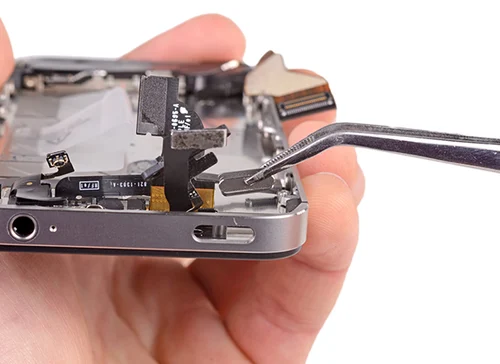
Follow the power button replacement guide below for expert troubleshooting tips and repair advice.
If you are having trouble turning your phone on and off, it could be one of many problems. While it could be a battery issue, it could also be a broken power button. Cell buttons can take a beating through everyday wear and tear. If the phone is dropped, internal components of the power button can be knocked loose or broken causing the connections to be missed. There are a few things that you can do to troubleshoot the problem before seeking repair.
First, you’ll want to make sure your battery is not dead. Charge your phone overnight and try the power the power button again. If the phone still doesn’t turn on, then it could be the power button. There are do-it-yourself kits available for replacing the power button. However, you will have to work with very small and delicate pieces of your phone, and you run the risk of causing further damage. The other problem is that you could replace the power button only to find out that the issue was really a faulty battery. A professional diagnosis and repair can minimize the risk.
If you need to use your phone or retrieve data from it before having it repaired, you might be able to power it on by removing the battery and plugging it into the charger. After about five minutes, the phone may power on by itself. This allows you to get any immediate information that you need.
If you have determined that you need a professional repair for your cell phone power button, our technicians are ready to help. We have the knowledge and experience to get your power button working quickly. Visit one of our stores today or use our convenient mail-in repair service to get started.
Other Issues


Get It Fixed Today!
CPR Cell Phone Repair can provide holistic warranty and repair solutions for all of your business’ devices.

Buy or Sell Your Device
CPR Cell Phone Repair can provide holistic warranty and repair solutions for all of your business’ devices.




All CPR Stores are independently owned and operated and may not offer all of the repair and warranty types listed on this website. Contact your local store for their specific repair capabilities and warranty terms. MMI-CPR, LLC and CPR Stores are not liable for warranties made by third parties on specific accessories or devices sold at CPR Stores. All product and company names are trademarks of their respective holders. iPhone, iPad, iPod, iPod touch, Mac and iMac are registered trademarks and property of Apple, Inc. CPR is a third-party repair company and is not affiliated with Apple.

Power Button Replacement
Follow the power button replacement guide below for expert troubleshooting tips and repair advice.
If you are having trouble turning your phone on and off, it could be one of many problems. While it could be a battery issue, it could also be a broken power button. Cell buttons can take a beating through everyday wear and tear. If the phone is dropped, internal components of the power button can be knocked loose or broken causing the connections to be missed. There are a few things that you can do to troubleshoot the problem before seeking repair.
First, you’ll want to make sure your battery is not dead. Charge your phone overnight and try the power the power button again. If the phone still doesn’t turn on, then it could be the power button. There are do-it-yourself kits available for replacing the power button. However, you will have to work with very small and delicate pieces of your phone, and you run the risk of causing further damage. The other problem is that you could replace the power button only to find out that the issue was really a faulty battery. A professional diagnosis and repair can minimize the risk.
If you need to use your phone or retrieve data from it before having it repaired, you might be able to power it on by removing the battery and plugging it into the charger. After about five minutes, the phone may power on by itself. This allows you to get any immediate information that you need.
If you have determined that you need a professional repair for your cell phone power button, our technicians are ready to help. We have the knowledge and experience to get your power button working quickly. Visit one of our stores today or use our convenient mail-in repair service to get started.
Choose what you need fixed to begin your Free repair estimate — we’ll guide you every step of the way.
Smartphone

Computer

Tablet

Console
All CPR Stores are independently owned and operated and may not offer all of the repair and warranty types listed on this website. Contact your local store for their specific repair capabilities and warranty terms. MMI-CPR, LLC and CPR Stores are not liable for warranties made by third parties on specific accessories or devices sold at CPR Stores. All product and company names are trademarks of their respective holders. iPhone, iPad, iPod, iPod touch, Mac and iMac are registered trademarks and property of Apple, Inc. CPR is a third-party repair company and is not affiliated with Apple.